The automatic file converter for macOS.
Rename to convert (yes, seriously).
Consul automatically converts files when you change their extension. Rename IMG_0073.HEIC to IMG_0073.jpg and it's instantly converted to a JPEG – works with documents, images, videos, and more.
Apple Silicon & Intel • macOS 14+
"I'm a skeptic when people post new apps here, because trash apps have become more frequent. So let me tell you: This looks fucking awesome!"
Designed to be forgotten
The most intuitive file converter there is.
Consul runs quietly in your menu bar, watching for renamed extensions and converting files automatically. Documents, images, videos – it just works.
- Smart format detection.
- Consul inspects the actual file contents, not just the extension. When you rename a file, it detects the mismatch and converts automatically.
- Works with dozens of formats.
- Images, audio, video, documents, spreadsheets. JPEG, PNG, HEIC, MP3, MP4, PDF, DOCX, and many more – all converted natively on your Mac.
- Fine-tuneable conversions.
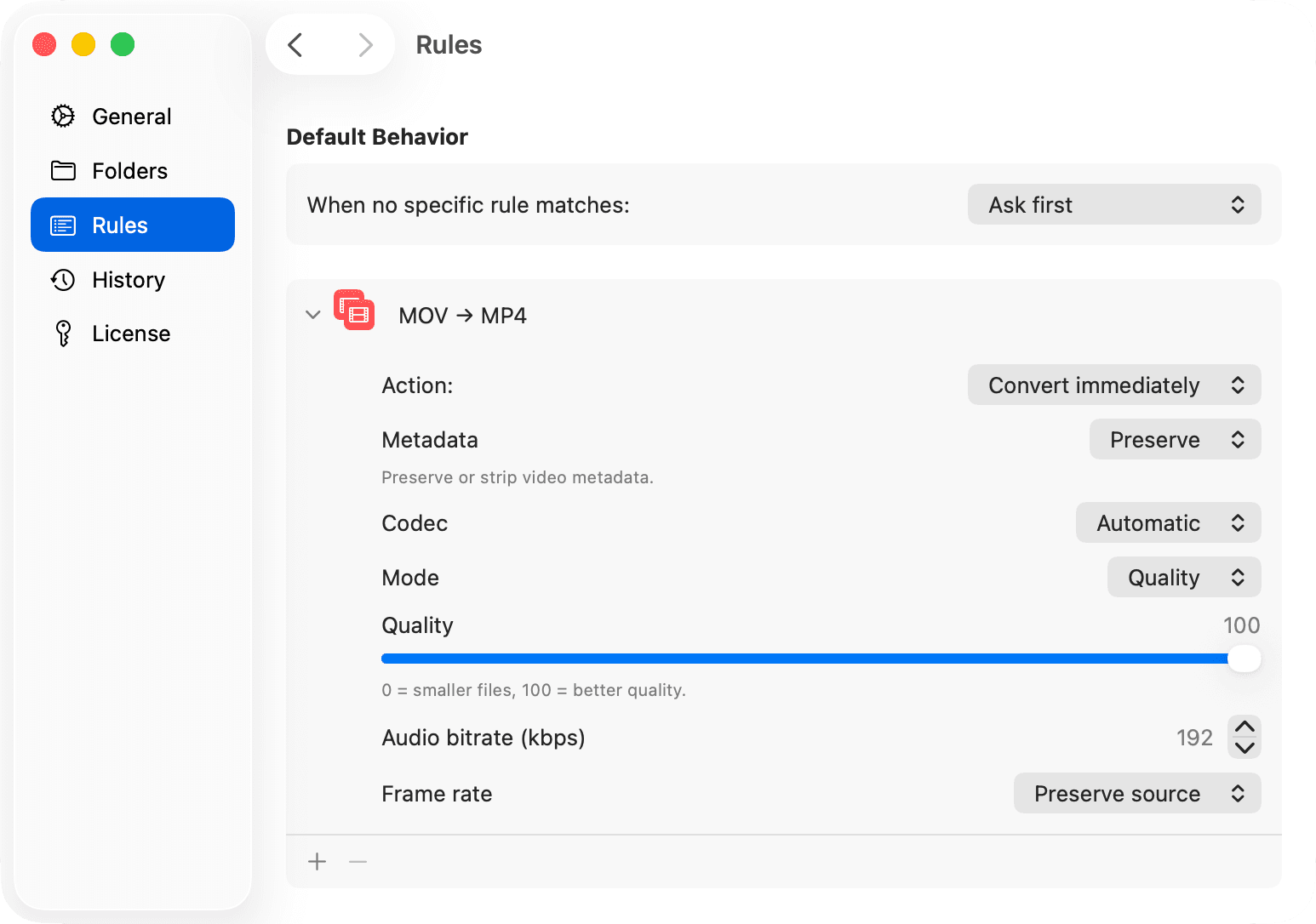
- Control exactly how each conversion is handled. Set when to convert, choose the output quality and codec, or strip metadata. You're in control.
So good, you'll forget you have it.
Consul is designed to be invisible. It runs quietly in your menu bar, watching for renamed extensions and converting files automatically.
Lives in your menu bar
Always ready, never in the way. Click the icon to manage conversions or pause monitoring.
100% private
Files never leave your Mac. No cloud uploads, no tracking, no shady online converters.
Blazing fast
Native macOS APIs with hardware acceleration. Most conversions finish in under a second.
Sees everything
Monitor your Desktop, Downloads, or your whole system. Add folders with drag & drop.
Never lose a file
The history and backup system means you can always undo a conversion if needed.
Try free for 14 days
Discover for yourself what users call "the macOS feature Apple forgot."
What people are saying
Real feedback from real users.
“I'm a skeptic when people post new apps here, because trash apps have become more frequent. So let me tell you: This looks fucking awesome!”
“I've been using this daily since launch and it's so insanely good that the only bad thing I can say about it is that I tend to forget I even have it installed, because of how intuitive and smooth it works.”
“What makes Consul such a pleasure is the complete absence of friction.”
“The best interface is no interface. Love it.”
“Tried the app for one minute, bought it right after.”
“By far one of my fav apps... so genius its gross.”
“This is how it should've been from the beginning. Brilliant!”
“This is actually shockingly intuitive. Nicely done.”
“Such a fun idea. One of those "why isn't this built into macOS already?" features.”
“Conversion happens in a fraction of a second, making it seem like a native macOS feature.”
“This is a perfect example of a simple, effective and truly native feeling app.”
“It's especially worthwhile for users who regularly need to convert a wide variety of file formats.”
“25 years+ graphics pro here. This is a super nice, intelligent, out of the box idea. I love it when I witness something like that. Really mate, wow.”
“A pretty user-friendly and time-saving idea. Great!”
 Tomeric on ifun.de
“This is seriously awesome. I constantly need to do stuff like PDF → Word, PNG → JPG, and every single time I end up Googling and wading through sketchy converter sites. Can't wait to try it.”
“An ingenious application allowing to convert files between the most diverse formats.”
“This is the kind of app that makes you wonder why it wasn't built into macOS from the start. Rename to convert is such an intuitive UX — zero learning curve.”
“I am very satisfied with it and will use Consul in the future when I need to convert file formats.”
“I didn't think I need it until I read JSON and YAML.”
“Fast, local, and without any server outside of your own system.”
“That's damn cool!!! Literal my childhood days when thinking renaming an extension will make it work fine right away!”
“Wow, what a good idea. Apple should give you some money.”
As featured in






Simple pricing. No subscriptions.
Purchase once, keep forever. No subscriptions. Receive one year of updates, with the option to renew for just $9/year after that.
Single
Perfect for personal use.
$19USD
- 1 device
- 1 year of updates
- Buy once, use forever
- Transferable license
Pro
For power users with multiple Macs.
$29USD
- 3 devices
- 1 year of updates
- Buy once, use forever
- Transferable license
Already a customer?
Renew updates for $9/year or add extra devices for $9/device.
Unlearn how to convert files today.
Download Consul and let file conversions be automatic. Try for free and find out why users say it's the "macOS feature Apple forgot".
Frequently asked questions
If you have anything else you want to ask, reach out.
How does this work?
Consul watches for renamed files to see if the extension was changed. It automatically converts the file to match the new extension (prompting you for confirmation first if you'd like). It only takes a fraction of a second for most files – it truly feels like a native macOS feature.
Which file formats are supported?
Consul supports a variety of image, audio, video, document, e-book, email, config, spreadsheet, archive, font, 3D model and subtitle formats. You can see a full list of supported formats here.
Does Consul upload my files anywhere?
Absolutely not! All conversions happen locally on your Mac. Your files never leave your computer and Consul also works offline. You won't have to upload your files to any shady online converters anymore, ever.
Is there a Windows or Linux version?
Not currently. Consul is built specifically for macOS using Apple's native frameworks. We're focused on making the Mac experience excellent before considering other platforms.
What does "1 year of updates" mean?
When you purchase Consul, you get every new update for the next 12 months. After that year, your latest version keeps working forever. If you want to keep receiving new features, you can always renew your license.
Can I watch folders on external drives?
Yes. Consul can watch any folder you have read/write access to, including external drives, NAS mounts, and cloud storage folders like Dropbox or iCloud Drive.
Do you offer student discounts?
Of course! Verified students receive a discount. To get started, click here to verify your student email address and claim your discount.
Do you offer bulk or team discounts?
Our Pro license covers up to 3 devices. If you need more, you can always buy additional devices at $9/device afterwards through the License Manager. If you want to deploy Consul to more than 10 devices, please reach out to [email protected] for a bulk discount.
What does the trial period include?
You can try out the full app including all features for a period of 14 days. Absolutely no limitations!